Check out Cassie Social for your Social Media Needs. Dismiss

    • Email
    • Facebook
    • Instagram
    • LinkedIn
    • Pinterest
    • YouTube

Cassie DeNisco

New Posts Weekly

  • Home
  • About Me
  • Contact Me
  • Cassie Social

4 Years of My Blog!

May 31, 2023

As I sit down to write this, I can hardly believe it’s been 4 years of my blog. My very first post was shared on May 15th, 2019 and it’s crazy that this much time has gone by. I thought we should walk down memory lane and I’d share some of my favorite posts from my 4 years!

Very First Post

Let’s Do This

This post makes me laugh because I truly didn’t know anything about blogging. It was a random day I decided to purchase a domain and a wordpress subscription and just started writing. I wasn’t expecting much out of it but these past 4 years have been such a wild ride!

Most Viewed Post

My Dyson Air Wrap Review

Talk about a random post to do so well! I wasn’t really expecting this post to be as successful as it was. I’ve even done a few others similar that have done well too. This is really where I realized people value honest opinions on items you purchased with your own money and it shifted the content I create!

Least Viewed Post

My Greek Salad Bowl

4 years of my blog

This is least viewed because it’s like one of the newer ones. Go give it some love because this bowl is SO good! I love creating and sharing recipes like this. I never would have thought that cooking would become such a huge part of my content and blog!!

My Favorite Post

Best Books to Read for 2023

This was so hard to choose but I’m just really proud of this post. Last year I created a monthly book club for the blog that has evolved into almost 2 book reviews a month consistently. This post is all about the books I read in 2022 and my recs for the new year. It’s a staple post when people ask what books I recommend!

I hope you loved this walk down memory lane with me. Having a blog is hard because so often we see the world switching to video content so I’m always trying to “fit in” with what’s trending. Blogging has taught me so much about all aspects of life and myself and I’ve had so much fun so far.

There have been many times over these 4 years that I’ve felt like I should just give up but I remember this amazing community we’ve created and how much I love what I do! Here’s to my first 4 years of my blog and to many more!

Follow me on

Pinterest & Instagram to keep up with my daily life!

A Yummy, Healthy Rice Bowl!

July 5, 2022

I’m super excited to be sharing this healthy rice bowl recipe with you! I was originally introduced to it through Green Chef, but I’ve made it so many times now I have my own take! Rice bowls are seriously such a good dinner idea because they have something for everyone.

I also love to have meatless nights but still get in enough protein. This bowl is so filling and if you wanted to add a meat protein, chicken, beef or turkey would pair well!! Here’s my recipe!

Ingredients:

1 cup White Rice

1 cup veggie broth

Tomato

Scallion

Lime

1 can pinto beans

1 can corn

1 tsp paprika

1 tsp chili flakes

1 tsp garlic powder

1 tbsp mayo

1 tbsp dijon mustard

Pecans

Directions:

  1. Bring veggie broth, rice, and salt to a boil then let simmer covered for about 10 minutes.
  2. Chop up tomato, scallion, lime, and rinse pinto beans
  3. Use half of the tomato, half of the scallion, and half the lime to create a salsa. Season with salt & pepper to taste.
  4. Saute the other half of tomato, scallion, and corn in the pan then add pinto peans and spices. Cook until heated.
  5. Add the cooked rice to this veggie pan and sprinkle with the other half of the lime. Mix thoroughly and remove from heat.
  6. Divide the rice & veggies evenly into bowls. Add salsa on top then pecans and finish off with dijon mustard & mayo mixed together and drizzled on top.

As you can see this bowl is so easy to make but jam packed with flavor. I seriously love to try out green chef recipes because they open your eyes to different ways to put food together! It really gives me the inspiration to create a healthy rice bowl like this!

If you liked this post, check out more recipes here ! Be sure to subscribe here to my newsletter so you never miss a post!

Summer Outfit Ideas for Warm Weather

June 27, 2022

I am totally embracing this warmer weather! I wanted to share some updated summer outfit ideas based on the trends we are seeing. Styling for summer is so fun because the colors are so bright and the patterns are so fun.

For me, this summer is all about comfort but elevated style. More than anything, these outfits will be wearable but actually look really great. As always I have affiliate links below so I make a small commission if you purchase through them!

Look 1- Bright Retro

summer outfit ideas

This poppy floral pattern is all over this summer! It really gives me a retro vibe and screams summer to me. I paired it with a solid basic top that still has a little fun with the sleeves. To finish off this look, I added a statement bag because look how cute it is. This is a perfect day or night look!

Shop the Look:

Skirt

Top

Bag

Look 2- Classic Basics

Jeans and a white top is probably my summer go to. Whether its jeans like this or jean shorts, there’s just something about the denim with white that is classic summer. I love that I paired this with a fun colored sandal because it just gives a pop of fun to a pretty basic look.

Shop the Look:

Jeans

Top

Shoes

Look 3- Casual Comfort

summer outfit ideas

I love a good set for summer. It seriously makes life so easy because you really just have to worry about accessories. I added a claw clip and a basic sandal but this is such a cute look that is put together. Sometimes when it gets hot I don’t want to get dressed up but I love pieces like this because it makes life easier.

Shop the Look:

Set

Clip

Sandals

Look 4- Beach Bum

summer outfit ideas

I’m telling you that the floral will seriously be in this summer! Not to mention, using an oversized button down as a cover up is seriously the move. I actually have these pieces myself because I just love this look. The sunglasses are so fun and just add that pop of color that a summer outfit needs.

Shop the Look:

Swimsuit

Button Down

Sunglasses

I hope you enjoyed these summer outfit ideas! I had so much fun putting this together like my holiday outfit ideas so let me know if you like these posts! Fashion is so much fun and I love seeing different ways people style outfits.

Be sure to subscribe here to my mailing list so you don’t miss a post!!

Content Creation Tips & Tricks

March 21, 2022

As many of you know, I am a freelance social media manager on top of blogger and dance teacher. I feel like because of this, I know a little more than the average blogger. This helps me utilize these content creation tips to keep me consistent.

A lot of people will say just be a content creator but they don’t realize how much actually goes into it. I didn’t start to see a real amount of money from my blog until about 3 years in after being consistent. This post is all about how and why I follow the content schedule I do and why you need to have one.

Honestly, I would say a content schedule that you can stick to is probably the most important key to growing any brand. A content schedule is not only when you’ll post on social but also when you’ll create that content. You need to have the content to post so it’s crucial that you stay on schedule and have content prepared.

Establishing a Schedule

content creation tips

I’ve found that I am best able to promote and spend time answering comments on a blog post on a Monday morning, which is why all of my blog posts are then at 9am. I decided this year to up my posts so I added two others during the month on Wednesdays. I average about 6 posts a month on the blog which is a lot.

In addition to the posts, I have to post on IG, Pinterest, Tik Tok to promote the post after it’s live which also is why Mondays are best for me. Establishing when you are going to post not only keeps you accountable but people come to expect content from you on those days. This easy transition helps you create a community that knows when to come back for more.

Content Ideas

content creations tips

In addition to a schedule, I like to start a running list of dates throughout the year I’m going to post. This helps me see what content would do best during those months and gives me a spot to write down my ideas.

I honestly just googled Mondays in 2022 and copy/pasted it into a Google Doc. I can access this whenever I get an idea and it helps me always have ideas when maybe I’m in a crunch to post. Visually, this also helps me cross off what I’ve already created for the month to know what I still need to do.

I recently just started this for my other socials which seriously has changed the game for me. I can plan out all of my content for the month and then I just need to write/record/create.

Creation

Once you figure out step one and two, creation really shouldn’t be too hard for you. Obviously you need to create it but if you already have the idea and when it needs to go live, you can just jump in.

I like to create my blog posts at least a month in advance just in case I have something come up one week. This buffer ensures I’ll always have a post go live. Sometimes I will post randomly if it’s time sensitive but for the most part I like to be ahead.

As for socials, I like to post in real time if I can. This means that I’ll create then post right away. I feel like my posts are usually more informal so it’s good for me to just get it out.

Creation Days

I like to set each day a week as a different platform. I’m almost always creating blog posts on Mondays and Tuesdays. I’ve been trying to create Tik Toks on Wednesdays and then I usually take my IG pictures on the weekends.

I like to batch create content so that I only have to get fully ready once in awhile and I can just get whatever I need done. This is probably my biggest tip to stay accountable because by setting a day aside for one platform, you don’t have the ability to not get it done if you have other days that are for other platforms.

I hope this post was informative for you in creating your content schedule and with content creation tips. Honestly, I wish I knew this back in the beginning because it would’ve saved me so much time. I used to create whenever I felt like it, which is of course great but not when you’re having an off week and don’t want to create anything.

Let me know if setting up a content schedule helped you to level up your content or if you liked these content creation tips! To read more social media posts like this click here! Don’t forget to subscribe to my mailing list here so you never miss a post!

How to Build a Brand Online

January 17, 2022

Whether you’re a blogger or just starting some sort of business, how to build a brand online is important for audience acquisition and growth. This is truly something I wish I knew prior to creating my blog because I just jumped in and didn’t focus on the bigger picture of what exactly this blog would be.

Your brand is how people will see you for the first time and decide whether or not they are interested in clicking on your link or following your account. It’s important to find a clear voice for whatever you’re starting so that you have the best chance of turning people into loyal audience members.

As we enter into this new year, if you’re taking the leap of creating your own brand I wanted to create this post to tell you what I wish I would’ve known. I’m sharing my top 3 tips and some other important info in between on how to build a brand online!

Color Palette Matters

how to build a brand online

In the beginning days of my blog, I was honestly just posting whatever I wanted. It didn’t matter to me how it looked or getting some sort of template together. If you are creating a brand, I would take some time during the creation stage to get your theme content together. There’s nothing worse then posts with different colors or different flows of content.

You want your website or your socials to be seamless and attractive to potential audience people. If you’re using crazy colors that are different in every single post, you’re not giving the audience a clear image of what to expect. The same goes for templates or posts in general.

I personally always recommend neutrals or soft colors that aesthetically look good together but if you want a rainbow themed brand, make sure you use the exact same colors. You can easily find the color codes online which makes keeping and using the same colors so easy.

People love to be comfortable and know what to expect so using the same colors and templates just keeps the audience happy and coming back for more. One bonus tip I have is if you are creating a website, either hire someone to design it or purchase a template because if you’re website isn’t easy to navigate, you’re going to lose readers/clients/customers.

Name is Everything

how to build a brand online

If I could go back in time, I don’t think I would’ve used my name for my blog. Catchy names are what really sticks and stands out. You’re also stuck with your name so if it’s something you’re not sure about in the beginning, wait it out and see if you’re still interested.

Name recognition is literally the most important part of your brand these days. Because everything is so saturated, having a brand name that is easy to associate with your brand and people will immediately recognize is everything.

My brand has become my name and that has worked for me but I do wish I was a little more creative in the beginning. I was a college student blogging about life and fashion so between that I probably could’ve found a unique and creative name. I am not going to change my name though because I have built an audience around it so just knowing you’re stuck with it, means it has to be good.

Another topic along names is making sure whatever you decide is actually available. Whether you’re making an LLC or just need social media accounts, if your name isn’t available how you want it I would consider thinking about something else. It is so important to have instant name recognition with your brand and if you can’t have a website domain with it, then there’s a chance you lose people when trying to find you.

Consistency is Key

I like to write out all my posts for the year.

I can’t stress this tip enough, you have to be consistent. Whether it’s posting, uploading, inventory, answering calls, whatever it is you need to be consistent. People found you and the only way they’ll stay is if you are giving them what they want. They initially related to you and your brand for a reason so it’s crucial you continue to give them that.

Whether it’s a consistent product drop schedule or maybe weekly blog posts, you have to keep that up because people like the expected. I’ve found that I keep more loyal audience members the months that I commit to my posting schedule and make sure I don’t miss it.

My brand will never grow if I ghost the audience members that I fought so hard to get to begin with. It’s a lot and exhausting but you have to keep giving the latest and greatest versions of you/your product to keep the momentum growing. You don’t want the momentum to be stagnant, you want growth and sucess.

Your brand needs you to continue to work and improve on it. It’s so hard to figure out how to get in the groove of it but once you do, you’ll see the rewards. It took me a solid 2.5 years to get my blog seeing consistent views everyday. It was definitely discouraging in the beginning but I kept posting and kept going and now I have an audience that is a community and looks forward to my content.

Wrap Up

This post was a long one! I hope though you took something away from it to help build a brand online. I really love getting to work with my social media clients to identify their voice and build something that they are proud of online.

The tips I just shared with you are the exact 3 things that I think would’ve helped me in the beginning of creating my blog. I now share them with my social media clients in hopes they will help them build a brand online for themselves!

If you’re interested in more social media tips you can check out some posts here! P.S. I am a Social Media Manager with a BS in Digital Audiences from ASU!

Follow me on instagram @cassiedenisco!

How to Make Money from Blogging

November 5, 2021

I am asked almost everyday how I make money from blogging. Blogging is something that a lot of people are interested in but not really sure how to start. I also think people are not sure if blogging can be a stream of income for them. It took me 3 years to get tot a point where I do have some passive income from my blog and I’m going to share with you my top 3 ways of how I make money from blogging!

Ads

make money from blogging

I think for most people, they think making money from ads is going to be so simple however this is the part that actually took me awhile! I needed to have my blog well established and continue to be creating trending content in order to see any money from this area. If you notice, I have ads on almost every page of my blog and they’re often about things you would actually be interested in.

I like to use Google Adsense not only because it’s super easy to install but I find that it also does the best job of staying relevant with my content. My biggest tips for running ads on your site is to make sure they have something to do with your content and there aren’t too many of them. You want your content to shine, not the ads!

Affiliate Links

make money from blogging
I like to use Like to Know It!

Oddly enough, I just started linking everything this past year. I realized that a great stream of passive income is affiliate links. Every time have on an outfit or a product, I always make sure to use my link generators in order to earn a commission from them.

You do have to make sure that you are disclosing whether or not something is an affiliate link to stay transparent with your audience. I just usually do a little disclaimer so people know that I get a very small kickback if they purchase through my link. Not only can you use affiliate links on your blog but you can also use them on your socials which just boosts your stream of income.

Sponsored Content

The first two ways of making money from blogging are simple and you can start almost as soon as you make your blog. With sponsored content, you’re going to need to make sure you have a well established audience first. Most brands want to work with people who have a clear and committed audience which most beginner bloggers don’t have.

You can grow your audience through a million different ways. Once you have some loyal followers, this stream of income to your blog can open up a lot of doors for you. Sponsored content helps you to build relationships with brands and mutually benefits you both by growing each others brands. Since I am only a micro influencer, I tend to go to more small businesses. We can help grow each others brands.

Making money from blogging takes a bit to get into but once you do, it can help grow your blog and change the way you look at blogging. For me, it was quite discouraging in the beginning to not even be making a cent but I stuck with it and am in a pretty comfortable place now.

Let me know in the comments your favorite ways to make money from blogging!

If you liked this post, check out how to drive traffic to your blog!

A Productive Work Day in My Life

April 23, 2021

Last year I shared a day in my life as a blogger, but this year things are very different for me! I now am a freelance social media consultant so not only do I have my own social media platforms, I also do a lot for other people. I thought it would be fun to share what a day in my life currently looks like and maybe share a few tips along the way on blogging and free lancing!

My Day

7:30-9am

productive work day

This time frame isn’t work related but I swear it’s what helps me start off on the right foot. I wake up around 7:30 and get Sky going for the day. If you have a Frenchie, then you know they literally love to sleep and she would sleep all day if I let her. This time period is essential for me to get myself ready for the day with skincare and maybe even a change in outfit if I’m feeling it. I also make my iced chai or iced oatmilk latte and am always at my desk my 9am.

9-9:10am

The first 10 minutes of my day are dedicated to emails. I’ll check them when I first get up but won’t reply until this time. I also like to make sure my planner is set and ready for the day. I love filling out this Doing Well Daily planner and then get in the right mindset for the day.

9:10-11am

This chunk of time is where the bulk of my work is. Depending on the day, I’m either writing and scheduling a blog post for myself or working on projects for clients. I shared a few weeks about how I plan and create my blog posts, but for client projects it’s usually working on their website, or getting together images and other media for a campaign. One other thing I recently started doing first thing is making sure I’m posting a IG or FB post or story first thing. I find that even if I’m not posting at the right time, it just helps with engagement and visibility. I try to post at least one thing per client first thing in the morning.

One question that I often get asked is how do I charge clients for work. It really depends. For somethings it would be a flat rate, like building a website but the day to day content posting and interacting is generally hourly. As many of you know I also am a dance teacher so this work that I do is usually part time as well. I like getting most of my bigger things done in this time period so I have enough time to get everything done in the day.

11-12:30pm

This is probably Sky’s favorite part of the day. We go for a walk and I workout, two things she absolutely loves. My workouts are usually a Melissa Wood Health video and maybe an arm circuit with dum bells. Sky is notorious for trying to workout with me, whether she’s doing her yoga stretches or trying to catch my feet, she loves MWH workouts as much as I do.

I also take the time to have lunch during this time. If you noticed, I don’t usually have breakfast so lunch is always my first meal of the day. Generally I have a salad, sandwich, or whatever leftovers we have from the night before. I can’t stand having to make a whole meal at lunch time when I just want to eat quick and get back into the day.

12:30- 3pm

This is usually the last chunk of time in my productive work day. I usually would leave for the dance studio shortly after this so that’s why 3 is usually the end of my day. I like to do my lighter tasks after lunch. I’m usually starting to hit the mid day slump so I make sure my work is lighter.

My favorite after lunch thing to do is work on content. Whether it’s the IG stories I post or my Pinterest pin images, I love this time of day. I use Canva to create my content like that and for my clients as well. Canva is my go to for my own content and other’s. It literally is amazing at doing so many things. Paying for the premium subscription is must for a social media manager. You can try Canva here!

Like I said, my day either ends with heading to the dance studio or taking Sky on another walk. Since I’m only doing this part time, I have a lot of flexibility with how and when I work. This is like my favorite thing because when I was interning, I know for a fact I hated being in an office 9-5.

My final productive work day tip is time blocking. As you noticed, I do everything in chunks of time. Each day is usually the same but with different tasks during that block of time. I find it makes me work harder knowing that I am only doing something for 2-3 hours at a time. It helps to keep my days less boring and me more engaged throughout the day.

I hope this productive work day gave you some tips and tricks on productivity and even social media consulting. If you’re interested on a post diving deeper into social media management let me know in the comments below!!

My Top Secret to Drive Traffic to My Blog

March 19, 2021

I get asked all the time, “cute blog but does anyone actually read it?”. People are shocked to find out yes, actually a lot of people read it, not just family or friends. I learned early on that if I wanted to make my blog a source of income I would need many, many people to read my posts. This lead to months of research trying to find anything that I could do to get traffic to my blog. Read more of my posts on blogs here.

I soon realized, driving traffic and eyes to a blog is a little different for everyone. The one thing I kept coming back to was Pinterest in my research. I could talk on and on about Pinterest and let my social media manager side really come out but for now I will stick to the basics and how I use it as a way to get people to read my posts.

Pinterest Basics

In case you don’t know, Pinterest is a social media app where you can curate boards based on different topics or categories. Pinterest is unique because it is basically a search engine. You type something in the top like you would on Google and many many pins come up. You can click on the pins, save them, or go directly to the link of the website they came from. If you’ve mastered SEO tactics, using Pinterest to create pins that will lead back to your blog should be a piece of cake for you. You can follow me on Pinterest here.

Creating Pins

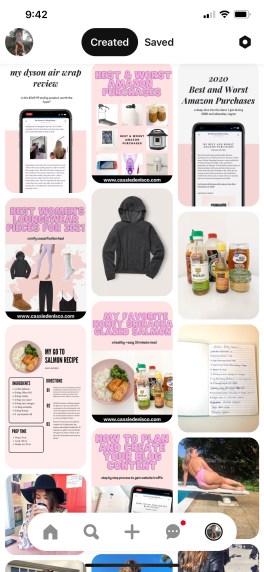
Every single blog post I create has a corresponding pin. This is super important because the pin is linked to the post on my website. People who see the pin then can click on the link to my website. As you can see from these example pins, I use the same template so that when someone comes to my account there’s a bit of cohesiveness.

Another thing I like to do is post just the images from the blog post without a template. I’ve found that some people on Pinterest like more organic pins and others like the template format. Also, I’ve heard really great things about people who post videos.

The Title, Description, Link, and Alt Text are crucial for you to fill out with keywords. This is where the SEO tactics come in. I do some research by typing in some of the keywords from my blog post in Pinterest and use the ones that generate content similar to mine. I fill my description with keywords and a few hashtags relevant so that people who are searching for my kind of content find it.

Scheduling Pins

One giant tip I have for you is to only focus your energy on one or two social media platforms. For me, I focus on IG Stories and Pinterest. I find I get the most interaction from them and they get me the most link clicks. To save time, I like to use the app Tailwind where it schedules and then posts my pins for me. This is game changing because I can have 20-30 pins going up every week to boost my engagement without me having to sit and do it myself.

Tailwind also has a feature where you can just loop your old pins. This helps my content to show more often. Good analytics and posting frequently is the key to getting your pins seen and links clicked on. Good engagement rates pull your content up higher when someone searches your keywords.

Realizing how useful Pinterest is to me was something that took awhile. I really had to build up my content and post consistently but I cannot reccomend trying it. I used to think that getting traffic to my blog was going to be so difficult with low followers but literally the game changed when I started focusing on Pinterest.

Let me know if you have any questions about Pinterest or if you have any tips for driving traffic to your blog!!

How I Plan and Create Blog Posts

February 5, 2021

With having my blog for almost 2 years now, I’ve truly started to get into the flow of how to plan and create blog posts. The first word that comes to mind when I think of my early days of blogging is overwhelming. In the beginning, it definitely was hard to figure out what to do first or how to even plan a post. This system didn’t come overnight but I’m going to walk your through my process and hopefully can help you out sooner rather than later.

Step 1: Brainstorming

If you were to look at my notebook of ideas, you would think I was crazy. I literally write down any and every thought that comes to mind of a potential post or content idea. Maybe I’ll use it or maybe it will just sit in the notebook forever but I make sure to always write it down. This has helped tremendously because I have a notebook of ideas now, something I didn’t have before. I can easily look at it and get the creative juices flowing for picking a topic.

Step 2: The Topic

Sometimes I already know exactly what I plan to post. Others, I have to refer to my notebook to get an idea. I like to think of my topics in terms of categories from my site. You can see here my posts are always put into a different category. Not only does this keep my blog organized but it helps to keep my topics within my niche. If I wrote last post about beauty products, I’ll try to make sure this post is a recipe or puppy related. This helps to narrow my choices and keep you, my reader, getting fresh content each week. Let me know if you’re interested in a blog post dedicated to just blog topics in the comments below!

how to create blog posts

Step 3: The Outline

I can’t start writing unless I have an outline. This isn’t necessarily something I write out but it’s a picture in my head of how I want the post to look. If you notice, I use a similar structure for recipes but a different one for product reviews. The photos and fonts are also something I like to starting imagining during this plan and create stage. One thing I never actually do is start with an outline that already has content. I like to just be able to write so I make sure that the outline in my head is ready and then I’m ready to write.

  • My Simple Pizza Recipe
  • Puppy Products You Need Right Now!

Step 4: Actually Writing

This step is absolutely different for everyone. When I plan and create blog posts, I want to make sure I am open for my content to go in a different direction. This is why I never have a set in stone outline. I take my theme and just get to writing it and seeing where the words and content take me. Whether it’s a recipe or a in depth how to, this step is one that you have to master . It takes a bit to get into a rhythm with writing and once you find a way to be productive, you’re all set.

Step 5: Images & other Visual Content

This might be odd, but I like to write my entire post but leave sections labeled {image} or {video} so that I’m able to just write. One reason for this is so that I’m not slowed down by uploading or downloading extras. If I need to take the pictures of products, I like to do so before I even write so that I can already know what I’m talking about. Images really help to bring your words to life so taking your time on these images will make a serious difference.

Step 6: Visibility & Scheduling

Ensuring your post is visible and will drive traffic is a crucial component to blogging. Once I have a pretty final cut of the post, I will go through and make sure I’ve hit SEO points (search engine optimization) and tagged this post properly. I want to make sure posts have everything they need in order to be ranked well on places like Google. On WordPress, I have an SEO plugin that helps make my life easier. Check it out in the image below. In addition, I’ll schedule the post for a time that I’ll be able to make social posts about it.

SEO and how to SEO
Yoast SEO Plugin- WordPress

Step 7: Promotion

Once your post is entirely finished and scheduled, I like to spend time creating the promotional posts for it. For me, this means a Pinterest pin, Insta stories, and an Insta post. My blog automatically goes out to Facebook and Twitter. This is so helpful so I don’t have to worry about them. I like to use websites like Canva.com to create these. Canva makes things so easy for you if you have no graphic design background, like me. If you’re interested in trying out Canva, use my link here for free Canva credit! I highly recommend taking the time to announce your blog posts on your social media platforms. This helps to to increase your traffic and visibility!

I really hope that this post gives you at least a few tips and tricks on how to plan and create blog posts. Blogging can be really rewarding but definitely overwhelming when you are starting out. This process is one that helps me produce the best content for you guys so I was happy to share just a bit of my knowledge.

Feel free to leave me any questions you may have below and be on the look out for my next post!

Tips on Starting a Blog from a Social Media Manager

August 28, 2020

Everyone absolutely love my post about things I wish I knew before starting a blog which you can read here, so I thought I would share more tips on on starting a blog. These are tips that I have helped me to stay successful and these tips on starting a blog also help you maintain your blog for the long haul.

Follow me:

Instagram @cassiedenisco

Facebook Cassie DeNisco

Twitter @cassiedenisco

Pinterest @cassiedenisco

Tik Tok @skythefrenchgirl

Website www.cassiedenisco.com

Next Page »

Hi there! Welcome to my blog, a place to find all things fashion, beauty and lifestyle

About me

  • Facebook
  • Instagram
  • LinkedIn
  • Pinterest
  • YouTube

Search

Pinterest

Copyright © 2026 · Theme by Blog Pixie

Loading Comments...